
R211x-HP Flexfabric 11900 Fundamentals Command Reference

97
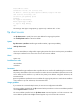
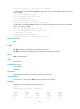
1569 bytes received in 0.00527 seconds (290.6 kbyte/s)
# In standalone mode, download file a.txt to the Flash root directory of the standby MPU (in slot 4 and
save it as c.txt.
ftp> get a.txt slot4#flash:/c.txt
local: slot4#flash:/c.txt remote: a.txt
150 Connecting to port 47460
226 File successfully transferred
1569 bytes received in 0.0564 seconds (27.2 kbyte/s)
# In IRF mode, download file a.txt to the Flash root directory of the MPU that resides in slot 5 of member
device 1, and save it as c.txt.
ftp> get a.txt chassis1#slot5#flash:/c.txt
local: chassis1#slot5#flash:/c.txt remote: a.txt
150 Connecting to port 47460
226 File successfully transferred
1569 bytes received in 0.0564 seconds (27.2 kbyte/s)
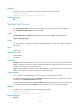
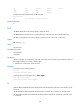
Related commands
put
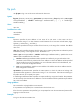
help
Use help to display all commands supported by an FTP client.
Use help command-name to display the help information of a specific command.
Syntax
help [ command-name ]
Views
FTP client view
Predefined user roles
network-admin
mdc-admin
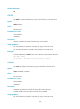
Parameters
command-name: Specifies a command supported by the FTP client.
Usage guidelines
In FTP client view, executing the help command is the same as entering?.
Examples
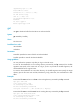
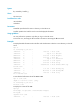
# Display all commands supported by the FTP client.
ftp> help
Commands may be abbreviated. Commands are:
append delete ls quit rmdir
ascii debug mkdir reget status
binary dir newer rstatus system
bye disconnect open rhelp user