
R211x-HP Flexfabric 11900 Fundamentals Command Reference
113
user
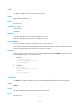
Use user to change to another user account after login.
Syntax
user username [ password ]
Views
FTP client view
Predefined user roles
network-admin
mdc-admin
Parameters
username: Specifies the username of the target user account.
password: Specifies the password of the target user account.
Usage guidelines
You can perform this operation only after you log in to the FTP server.
The username and password of the target user account must have been configured. Otherwise, the user
account change operation fails and the FTP connection is closed.
Examples
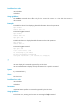
# After logging in to the FTP server, use the username ftp and password 123 456 to re-log in to the FTP
server (the output might vary by the FTP server):
• Method 1
ftp> user ftp 123456
331 Password required for ftp.
230 User logged in.
• Method 2
ftp> user ftp
331 Password required for ftp.
Password:
230 User logged in.
verbose
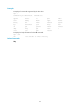
Use verbose to enable or disable the device to display detailed information about FTP operations.
Syntax
verbose
Default
The device displays detailed information about FTP operations.
Views
FTP client view