
R211x-HP Flexfabric 11900 Fundamentals Command Reference
124
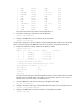
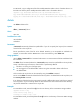
2 NONE Absent 0 NONE None
3 NONE Absent 0 NONE None
4 LSU1SUPB9 Master 0 11900-2111 None
5 LSU1SUPB9 Standby 0 11900-2111 None
6 NONE Absent 0 NONE None
7 NONE Absent 0 NONE None
8 NONE Absent 0 NONE None
9 NONE Absent 0 NONE None
10 LSU1FAB08D9 Normal 0 11900-2111 None
11 NONE Absent 0 NONE None
12 NONE Absent 0 NONE None
13 NONE Absent 0 NONE None
The output shows that the slot number of the standby MPU is 4.
2. Access the root directory of the Flash on the standby MPU.
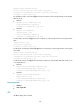
<Sysname> cd slot4#flash:/
3. Change to the test folder in the root directory of the active MPU.
<Sysname> cd flash:/test
# In IRF mode, change to the Flash root directory of the standby MPU that resides in slot 5 of member
device 2, and then change to the test folder in the Flash root directory of the global active MPU.
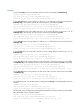
4. Display the member IDs and slot numbers of the IRF fabric's MPUs.
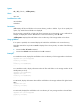
<Sysname> display irf
MemberID Slot Role Priority CPU-Mac Description
2 4 Standby 20 00e0-fc0f-8c0f ---
2 5 Standby 20 00e0-fc0f-8c1f ---
*+3 4 Master 20 00e0-fc0f-8c22 ---
3 5 Standby 20 00e0-fc0f-8c32 ---
--------------------------------------------------
* indicates the device is the master.
+ indicates the device through which the user logs in.
The Bridge MAC of the IRF is: 00e0-fc00-0a00
Auto upgrade : yes
Mac persistent : always
Domain ID : 0
Auto merge : no
The output shows that the active MPU of the IRF fabric resides in slot 4 of member device 3 and the
IRF fabric has three standby MPUs: one resides in slot 4 of member device 2, one in slot 5 of
member device 2, and one in slot 5 of member device 3.
5. Access the test folder in the Flash root directory of the global active MPU.
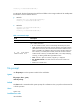
<Sysname> cd flash:/test
6. Change to the Flash root directory of the standby MPU that resides in slot 4 of member device 2.
<Sysname> cd chassis2#slot4#flash:/
7. Change to the test folder in the Flash root directory of the global active MPU.
<Sysname> cd flash:/