
R211x-HP Flexfabric 11900 Fundamentals Command Reference

125
copy
Use copy to copy a file.
Syntax
copy fileurl-source fileurl-dest
Views
User view
Predefined user roles
network-admin
mdc-admin
Parameters
fileurl-source: Specifies the name or URL of the file to be copied. If the file resides on an FTP or TFTP server
rather than on the device, specify the URL of the file. Whether a URL is case sensitive depends on the
server.
fileurl-dest: Specifies the name or URL of the destination file or directory. To copy the source file to an FTP
or TFTP server, specify a URL. If you specify a directory, the device copies the specified file to the directory
and saves it with its original file name. Whether a URL is case sensitive depends on the server.
Usage guidelines
You can use the copy command to perform the following operations:
• Copy a local file and save it locally.
• Copy a local file and save it to an FTP or TFTP server.
• Copy a file on an FTP or TFTP server and save it locally.
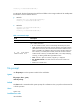
To specify a file or directory, use the following guidelines:
Location Name format Remarks
On the device
Use the file name guidelines in
Fundamentals Configuration Guide.
N/A
On an FTP server
Enter the URL in the format ftp://FTP
username[:password]@server
address[:port number]/file path[/file
name].
The username and password must be the same as
those configured on the FTP server. If the server
authenticates users only by the username, you are
not required to enter the password.
For example, to use the username 1 and password
1 and specify the startup.cfg file in the authorized
working directory on FTP server 1.1.1.1, enter the
URL ftp://1:1@1.1.1.1/startup.cfg.
To specify an IPv6 address, enclose the IPv6
address in square brackets ([ ]), for example,
ftp://test:test@[2001::1]:21/test.cfg.
On a TFTP server
Enter the URL in the format
tftp://server address[:port
number]/file path[/file name].
For example, to specify the startup.cfg file in the
working directory on TFTP server 1.1.1.1, enter
the URL tftp://1.1.1.1/startup.cfg.
To enter an IPv6 address, enclose the IPv6 address
in square brackets ([ ]), for example,
ftp://test:test@[2001::1]:21/test.cfg.