
R211x-HP Flexfabric 11900 Fundamentals Command Reference
126
Examples
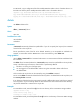
# Copy the test.cfg file in the current folder and save it to the current folder as testbackup.cfg.
<Sysname> copy test.cfg testbackup.cfg
Copy flash:/test.cfg to flash:/testbackup.cfg?[Y/N]:y
Copying file flash:/test.cfg to flash:/testbackup.cfg...Done.
# Copy test.cfg from the working directory on FTP server 1.1.1.1 and save it to the local current folder as
testbackup.cfg. In this example, the FTP username and password are user and private.
<Sysname> copy ftp://user:private@1.1.1.1/test.cfg testbackup.cfg
Copy ftp://user:private@1.1.1.1/test.cfg to flash:/testbackup.cfg?[Y/N]:y
Copying file ftp://user:private@1.1.1.1/test.cfg to flash:/testbackup.cfg... Done.
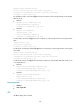
# Copy test.cfg from the current folder and save it to the working directory on FTP server 1.1.1.1 as
testbackup.cfg. In this example, the FTP username and password are user and private.
<Sysname> copy test.cfg ftp://user:private@1.1.1.1/testbackup.cfg
Copy flash:/test.cfg to ftp://user:private@1.1.1.1/testbackup.cfg?[Y/N]:y
Copying file flash:/test.cfg to ftp://user:private@1.1.1.1/testbackup.cfg... Done.
# Copy test.cfg from the working directory on TFTP server 1.1.1.1 and save it to the local current folder as
testbackup.cfg.
<Sysname> copy tftp://1.1.1.1/test.cfg testbackup.cfg
Copy tftp://1.1.1.1/test.cfg to flash:/testbackup.cfg?[Y/N]:y
Copying file tftp://1.1.1.1/test.cfg to flash:/testbackup.cfg... Done.
# Copy test.cfg from the current folder and save it to the working directory on TFTP server 1.1.1.1 as
testbackup.cfg.
<Sysname> copy test.cfg tftp://1.1.1.1/testbackup.cfg
Copy flash:/test.cfg to tftp://1.1.1.1/testbackup.cfg?[Y/N]:y
Copying file flash:/test.cfg to tftp://1.1.1.1/testbackup.cfg... Done.
# Copy test.cfg from the working directory on FTP server 2001::1 and save it to the local current folder
as testbackup.cfg. In this example, the FTP username and password are user and private, respectively.
<Sysname> copy ftp://user:private@[2001::1]/test.cfg testbackup.cfg
Copy ftp://user:private@[2001::1]/test.cfg to flash:/testbackup.cfg?[Y/N]:y
Copying file ftp://user:private@[2001::1]/test.cfg to flash:/testbackup.cfg... Done.
# Copy test.cfg from the working directory on TFTP server 2001::1 and save it to the local current folder
as testbackup.cfg.
<Sysname> copy tftp://[2001::1]/test.cfg testbackup.cfg
Copy tftp://[2001::1]/test.cfg to flash:/testbackup.cfg?[Y/N]:y
Copying file tftp://[2001::1]/test.cfg to flash:/testbackup.cfg... Done.
# In standalone mode, copy the active MPU's configuration file test.cfg to the standby MPU's Flash root
directory.
<Sysname> copy test.cfg slot5#flash:/
Copy flash:/test.cfg to slot5#flash:/test.cfg?[Y/N]:y
Copying file flash:/test.cfg to slot5#flash:/test.cfg...Done.
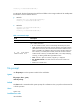
# In IRF mode, copy a configuration file of the global active MPU to the Flash root directory of the standby
MPU that resides in slot 5 of member device 1.
<Sysname> copy test.cfg chassis1#slot5#flash:/
Copy flash:/test.cfg to chassis1#slot5#flash:/test.cfg?[Y/N]:y
Copying file flash:/test.cfg to chassis1#slot5#flash:/test.cfg...Done.