
R211x-HP Flexfabric 11900 Fundamentals Command Reference
153
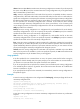
chassis chassis-number slot slot-number: Saves the running configuration to an MPU. If you do not specify
this option or the all keyword, the command saves the running configuration only to the global active
MPU in the IRF fabric. (In IRF mode.)
safely: Saves the configuration file in safe mode. If this keyword is not specified, the device saves the
configuration file in fast mode. Safe mode is slower than fast mode, but more secure. In safe mode, the
system saves configuration in a temporary file and starts overwriting the target next-startup configuration
file after the save operation is complete. If a reboot, power failure, or out of memory event occurs during
the save operation, the next-startup configuration file is retained. In fast mode, the device directly
overwrites the target next-startup configuration file. If a reboot, power failure, or out of memory event
occurs during this process, the next-startup configuration file is lost. HP recommends that you specify the
safely keyword for the command.
backup: Saves the running configuration to a configuration file, and specifies the file as the backup
next-startup configuration file. If you do not specify this keyword or the main keyword, the command
specifies the saved file as the main next-startup configuration file.
main: Saves the running configuration to a configuration file, and specifies the file as the main
next-startup configuration file. If you do not specify this keyword or the backup keyword, the command
specifies the saved file as the main next-startup configuration file.
force: Saves the running configuration without prompting for confirmation. Without this keyword, the
system prompts you to confirm the operation. If you do not confirm the operation within 30 seconds, the
system automatically aborts the operation. If you enter Y within the time limit, you can continue the save
process and change the next-startup configuration file during this process.
mdc-all: Saves the running configuration for each MDC. This keyword is available only on the default
MDC. If this keyword is not available or you do not specify this keyword, the save command saves the
running configuration only for the MDC where you are logged in.
Usage guidelines
If the file specified for the command does not exist, the system creates the file before saving the
configuration. If the file already exists, the system prompts you to confirm whether to overwrite the file. If
you choose to not overwrite the file, the system cancels the save operation.
If you do not specify the file-url option for the command, the command saves the running configuration
to an .mdb binary file as well as a .cfg text file. The two files use the same file name. An .mdb file takes
less time to load than a .cfg file.
If you specify the file-url option for the command, the command only saves the running configuration to
the specified .cfg file.
Examples
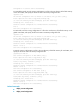
# Save the running configuration to the configuration file backup.cfg, without specifying the file as the
next-startup configuration file.
<Sysname> save backup.cfg
The current configuration will be saved to flash:/backup.cfg. Continue? [Y/N]:y
Now saving current configuration to the device.
Saving configuration
flash:/backup.cfg. Please wait...
Configuration is saved to flash successfully.
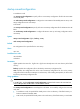
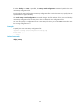
# Save the running configuration to the main next-startup configuration file without any confirmation
required.
<Sysname> save force
Validating file. Please wait....