
R211x-HP Flexfabric 11900 Fundamentals Command Reference
161
In IRF mode:
bootrom backup chassis chassis-number slot slot-number-list
Views
User view
Predefined user roles
network-admin
Parameters
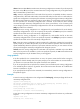
slot slot-number-list: Specifies a space-separated list of up to seven slot number items. Each item specifies
a card by its slot number or a range of cards in the form of start-slot-number to end-slot-number. For
example, slot 4 to 1 2. (In standalone mode.)
chassis chassis-number: Specifies an IRF member device by its member ID. (In IRF mode.)
slot slot-number-list: Specifies a space-separated list of up to seven slot number items. Each item specifies
a card by its slot number or a range of cards in the form of start-slot-number to end-slot-number on the
specified IRF member device. For example, slot 4 to 1 2. (In IRF mode.)
Usage guidelines
A BootWare is divided into a Normal area and a Backup area. The BootWare image is stored in the
Normal area and backed up to the Backup area. At startup, the system reads the BootWare image
automatically from the Normal area. If the image is inaccessible, the system reads the BootWare image
from the Backup area.
If the BootWare image in the Normal area is corrupted or requires a version rollback, use the bootrom
restore command to copy the BootWare image in the Backup area to the Normal area.
Examples
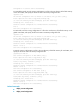
# Back up the entire BootWare image from the Normal area to the Backup area.
<Sysname> bootrom backup all
Now backuping the Boot ROM, please wait...
......Done.
Related commands
bootrom restore
bootrom restore
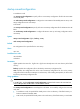
Use bootrom restore to replace the BootWare image in the Normal area with the BootWare image in the
Backup area for image restoration or version rollback.
Syntax
In standalone mode:
bootrom restore slot slot-number-list
In IRF mode:
bootrom restore chassis chassis-number slot slot-number-list
Views
User view