
R211x-HP Flexfabric 11900 Fundamentals Command Reference

165
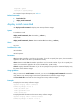
flash:/11900-CMW710-SYSTEM-E2110L06.bin
flash:/11900-CMW710-SSH-E2110L06.bin
Backup startup software images:
flash:/11900-CMW710-BOOT-E2110L06.bin
flash:/11900-CMW710-SYSTEM-E2110L06.bin
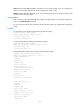
# In IRF mode, displays current software images and startup software images.
<Sysname> display boot-loader
Software images on chassis 0 slot 5:
Current software images:
flash:/11900-CMW710-BOOT-E2110L06.bin
flash:/11900-CMW710-SYSTEM-E2110L06.bin
Main startup software images:
flash:/11900-CMW710-BOOT-E2110L06.bin
flash:/11900-CMW710-SYSTEM-E2110L06.bin
flash:/11900-CMW710-SSH-E2110L06.bin
Backup startup software images:
flash:/11900-CMW710-BOOT-E2110L06.bin
flash:/11900-CMW710-SYSTEM-E2110L06.bin
Table 20 Command output
Field Descri
p
tion
Software images on slot slot-number
In standalone mode, this field displays the Comware images on
the MPU in a specific slot.
Software images on chassis chassis-id slot
slot-number
In IRF mode, this field displays the Comware images on a specific
MPU. The chassis ID represents the IRF member ID, and the slot
number represents the MPU's slot number.
Current software images Comware images that have been loaded.
Main startup software images Main Comware images for the next startup.
Backup startup software images Backup Comware images for the next startup.
Related commands
boot-loader file
version auto-update enable
Use version auto-update enable to enable software synchronization from the active MPU to the standby
MPU at startup.
Use undo version auto-update enable to disable the function.
Syntax
version auto-update enable
undo version auto-update enable
Default
If software inconsistency is detected at startup, the standby MPU loads the current software images of the
active MPU.