
R211x-HP Flexfabric 11900 Fundamentals Command Reference
179
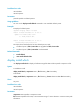
Predefined user roles
network-admin
network-operator
Parameters
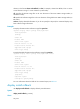
point-id: Specifies a rollback point ID.
Usage guidelines
You can use the display install rollback command to view available rollback points.
Examples
# Display all rollback points.
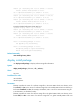
<Sysname> display install rollback
Install rollback information 1 on slot 5:
Update from flash:/route-1.bin
to flash:/route-2.bin.
Install rollback information 2 on slot 5:
Deactivating flash:/route-2.bin
The output shows that the device has two rollback points in total:
• At rollback point 1, flash:/route-1.bin was upgraded to flash:/route-2.bin.
• At rollback point 1, flash:/route-2.bin was deactivated.
Related commands
• install rollback
• reset install rollback oldest
display install which
Use display install which to display all software image files that include a specific component or file.
Syntax
In standalone mode:
display install which { component name | file filename } [ slot slot-number ]
In IRF mode:
display install which { component name | file filename } [ chassis chassis-number slot slot-number ]
Views
Any view
Predefined user roles
network-admin
network-operator
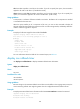
Parameters
component name: Specifies a component name.
file filename: Specifies a file name, a case-insensitive string of 1 to 63 characters. It cannot contain path
information.