
R211x-HP Flexfabric 11900 Fundamentals Command Reference
180
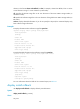
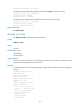
slot slot-number: Specifies a card by its slot number. If you do not specify this option, the command is
applied to all cards in the device. (In standalone mode.)
chassis chassis-number slot slot-number: Specifies a card on an IRF member. If you do not specify this
option, the command is applied to all cards in the IRF fabric. (In IRF mode.)
Usage guidelines
A component is a collection of features related to each other. The features of a component are installed
or uninstalled at the same time.
When the system notifies you of a component or file error, you can use this command to display all
software image files that include the component or file on certain storage media, and thereby determine
whether a software upgrade is required.
Examples
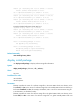
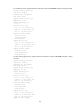
# Display all software image files that include file sshc.cli.
<Sysname> display install which file sshc.cli
File sshc.cli is in following packages on slot 5:
[Package]
Vendor: xxx
Product: xxxx
Service name: ssh
Platform version: 7.1.045
Product version: Release 2110
Supported board: mpu lpu
Version type: debug
For more information about the fields of the command output, see Table 21.
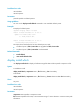
display issu rollback-timer
Use display issu rollback-timer to display automatic-rollback timer information.
Syntax
display issu rollback-timer
Views
Any view
Predefined user roles
network-admin
network-operator
Usage guidelines
Because change to the automatic-rollback interval does not take effect on the ongoing ISSU process, the
current remaining rollback time might be greater than the configured automatic-rollback interval.
Examples
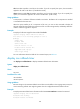
# Display automatic-rollback timer information after the issu run switchover command is executed.
<Sysname> display issu rollback-timer
Rollback timer: Working
Rollback interval: 45 minutes