
R211x-HP Flexfabric 11900 Fundamentals Command Reference

209
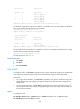
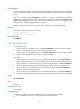
Chassis Slot Upgrade Way
1 1 Service Upgrade
1 2 Service Upgrade
1 3 Service Upgrade
1 4 Service Upgrade
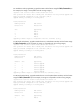
Upgrading software images to compatible versions. Continue? [Y/N]:y
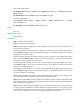
# In IRF mode (single-MPU single-chassis), upgrade the MPU on member device 1 with the feature image
file
flash:/feature.bin. (In this example, the image is incompatible with the running images.)
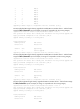
<Sysname>issu load file feature flash:/feature.bin chassis 1 slot 4
This operation will delete the rollback point information for the previous upgrade and
maybe get unsaved configuration lost. Continue? [Y/N]:Y
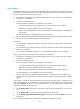
Upgrade summary according to following table:
flash:/feature.bin
Running Version New Version
Release 2110 Release 2111
Chassis Slot Upgrade Way
1 1 Reboot
1 2 Reboot
1 3 Reboot
1 4 Reboot
Upgrading software images to incompatible versions. Continue? [Y/N]:y
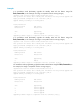
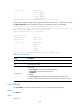
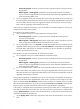
Table 25 Command output
Field Descri
p
tion
Chassis Member ID of the device in the IRF fabric. (In IRF mode.)
Slot Slot number of the card.
Upgrade Way
ISSU method:
• Service Upgrade—Service-level incremental upgrade.
• File Upgrade—File-level incremental upgrade.
• ISSU Reboot.
• Reboot.
• Sequence Reboot—This method is only available for switching fabric cards.
For more information about ISSU methods, see Fundamentals Configuration Guide.
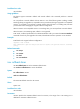
issu rollback
Use issu rollback to cancel the ISSU and roll back to the original software configuration.
Syntax
issu rollback
Views
User view