
R211x-HP Flexfabric 11900 Fundamentals Command Reference

21
40:XXXX XXXX XXXX XXXX
56:XXXX XXXX XXXX XXXX
1 lines used. (U)
71 lines not used. (X)
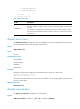
Table 2 Command output
Fields Description
number:status
The number indicates the absolute number of the first user line of the user line class.
The status indicates whether or not the user lines are being used (X for unused and U
for used).
For example, if "0:XUXX XXXX" is displayed, the user line class has eight user lines.
The user lines use the absolute numbers 0 through 7. User line 1 is being used, and the
others are not.
display telnet client
Use display telnet client to display the source IPv4 address or source line configured for the device to use
for outgoing Telnet packets when serving as a Telnet client.
Syntax
display telnet client
Views
Any view
Predefined user roles
network-admin
network-operator
mdc-admin
mdc-operator
Examples
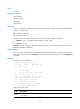
# Display the Telnet client configuration of the device when it serves as a Telnet client.
<Sysname> display telnet client
The source IP address is 1.1.1.1.
The output shows that the device uses the source IPv4 address 1.1.1.1 for outgoing Telnet packets when it
serves as a Telnet client.
Related commands
telnet client source
display user-interface
Use display user-interface to display user line information.
Syntax
display user-interface [ number1 | { aux | vty } number2 ] [ summary ]