
R211x-HP Flexfabric 11900 Fundamentals Command Reference
300
Examples
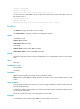
# In standalone mode, allow MDC sub1 to use up to 30 percent of the disk space on the MPU in slot 0.
<Sysname> system-view
[Sysname] mdc sub1
[Sysname-mdc-2-sub1] limit-resource disk slot 0 ratio 30
# In IRF mode, allow MDC sub1 to use up to 30 percent of the disk space on the MPU in slot 0 on IRF
member device 2.
<Sysname> system-view
[Sysname] mdc sub1
[Sysname-mdc-2-sub1] limit-resource disk chassis 2 slot 0 ratio 30
limit-resource memory
Use limit-resource memory to specify an MPU memory space percentage for an MDC.
Use undo limit-resource memory to restore the default.
Syntax
In standalone mode:
limit-resource memory slot slot-number ratio limit-ratio
undo limit-resource memory slot slot-number
In IRF mode:
limit-resource memory chassis chassis-number slot slot-number ratio limit-ratio
undo limit-resource memory chassis chassis-number slot slot-number
Default
All MDCs share the memory space of the MPUs in the system, and an MDC can use all the free memory
space.
Views
MDC view
Predefined user roles
network-admin
Parameters
slot slot-number: Specifies an MPU. (In standalone mode.)
chassis chassis-number slot slot-number: Specifies an MPU on an IRF member device. (In IRF mode.)
ratio limit-ratio: Specifies the ratio of the memory space that an MDC can use on the specified MPU to
the total memory space of the MPU. The value range is 1 to 100.
Usage guidelines
This command sets the maximum amount of memory space that an MDC can use. Make sure this amount
is sufficient for the MDC to operate correctly.
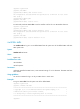
Examples
# In standalone mode, allow MDC sub1 to use up to 30 percent of the memory space on the MPU in slot
0.