
R211x-HP Flexfabric 11900 Fundamentals Command Reference
35
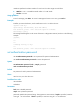
telnet: Supports Telnet only.
Usage guidelines
This configuration is effective only for a user who logs in through the user line after the configuration is
completed.
Before configuring a user line to support SSH, set the authentication mode to scheme for the user line. For
more information, see authentication-mode.
This command is available in both VTY line view and VTY line class view. In VTY line view, this command
is associated with the authentication-mode command:
• If the setting of either command is not the default in VTY line view, the setting of the other command
in VTY line view takes effect.
• If the settings of both commands are the defaults in VTY line view, the settings of the commands in
VTY line class view take effect.
Examples
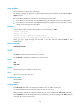
# Enable user lines VTY 0 through VTY 4 to support only SSH.
<Sysname> system-view
[Sysname] line vty 0 4
[Sysname-line-vty0-4] authentication-mode scheme
[Sysname-line-vty0-4] protocol inbound ssh
# Enable scheme authentication for the VTY line class and enable the line class to support only SSH.
Disable authentication for VTY lines 0 through 4.
<Sysname> system-view
[Sysname] line class vty
[Sysname-line-class-vty] authentication-mode scheme
[Sysname-line-class-vty] protocol inbound ssh
[Sysname-line-class-vty] line vty 0 4
[Sysname-line-vty0-4] authentication-mode none
screen-length
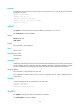
Use screen-length to set the maximum number of lines to be displayed on a screen.
Use undo screen-length to restore the default.
Syntax
screen-length screen-length
undo screen-length
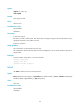
Default
Up to 24 lines are displayed on a screen.
Views
User line view, user line class view
Predefined user roles
network-admin
mdc-admin