
R211x-HP Flexfabric 11900 Fundamentals Command Reference
48
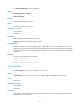
last-number1: Specifies the absolute number of the last user line. This number cannot be smaller than
first-number1.
aux: Specifies the AUX line.
vty: Specifies the VTY line.
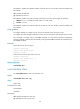
first-number2: Specifies the relative number of the first user line. The value ranges are as follows:
• AUX line—0 to 1 in standalone mode and 0 to 7 in IRF mode.
• VTY line—0 to 63.
last-number2: Specifies the relative number of the last user line. This number cannot be smaller than
first-number2.
Usage guidelines
To configure settings for a single user line, use this command to enter the user line view.
To configure the same settings for multiple user lines, use this command to enter multiple user line views.
This command is an older version of the line command. It is reserved for backward compatibility
purposes. Although it has the same functionality and output as the line command, HP recommends you
use the line command.
Examples
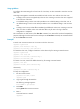
# Enter the view of user line AUX 1.
<Sysname> system-view
[Sysname] user-interface aux 1
[Sysname-line-aux1]
# Enter the views of user lines VTY 0 to VTY 4.
<Sysname> system-view
[Sysname] user-interface vty 0 4
[Sysname-line-vty0-4]
Related commands
user-interface class
user-interface class
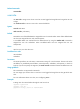
Use user-interface class to enter user line class view.
Syntax
user-interface class { aux | vty }
Views
System view
Predefined user roles
network-admin
mdc-admin
Parameters
aux: Specifies the AUX line class view.
vty: Specifies the VTY line class view.