
R211x-HP Flexfabric 11900 Fundamentals Command Reference
50
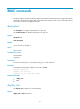
Related commands
user-interface
user-role
Use user-role to assign a user role to a user line so users logged in through the user line get the user role
at login.
Use undo user-role to remove a user role or restore the default.
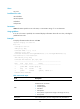
Syntax
user-role role-name
undo user-role [ role-name ]
Default
An AUX line user of the default MDC is assigned the user role network-admin. Users of other default MDC
user lines are assigned the user role network-operator.
A non-default MDC user switched from the default device by using the switchto mdc command is
assigned the user role mdc-admin. Other non-default MDC users are assigned the user role
mdc-operator.
Views
User line view, user line class view
Predefined user roles
network-admin
mdc-admin
Parameters
role-name: Specifies a user role name, a case-sensitive string of 1 to 63 characters. The user role can be
user-defined or predefined (network-admin, network-operator, mdc-admin, mdc-operator, or level-0 to
level-15). If you do not specify this argument, the undo user-role command restores the default user role.
Usage guidelines
This command is not supported in FIPS mode.
You can assign up to 64 user roles to a user line. A user logged in through the user line gets all the user
roles.
For more information about user roles, see "Configuring RBAC."
Examples
# Assign user role network-admin through the user line VTY 0.
<Sysname> system-view
[Sysname] line vty 0
[Sysname-line-vty0] user-role network-admin