
R211x-HP Flexfabric 11900 Fundamentals Command Reference

69
• Command rule—Controls access to a command or a set of commands that match a regular
expression.
• Feature rule—Controls access to the commands of a feature by command type.
• Feature group rule—Controls access to the commands of a group of features by command type.
A user role can access the set of permitted commands specified in its rules. User role rules include
predefined (identified by sys-n) and user-defined rules.
• If two user-defined rules of the same type conflict, the one with the higher ID takes effect. For
example, if rule 1 permits the ping command, rule 2 permits the tracert command, and rule 3
denies the ping command, the user role can use the tracert command but not the ping command.
• If a predefined user role rule and a user-defined user role rule conflict, the user-defined user role rule
takes effect.
You can configure up to 256 user-defined rules for a user role, but the total number of user-defined user
role rules in the system cannot exceed 1024.
Any rule modification, addition, or removal for a user role takes effect only on the users who log in with
the user role after the change.
Access to the file system commands is controlled by both the file system command rules and the file
system feature rule.
A command with output redirection to the file system is permitted only when the command type write is
assigned to the file system feature.
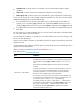
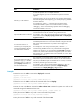
When you specify a command string, follow the guidelines in Table 8.
Table 8 Command stri
ng configuration rules
Rule Guidelines
Semicolon (;) is the delimiter.
Use a semicolon to separate the command of each view that you must
enter before you access a command or a set of commands, except for the
commands (for example, display and dir) available in user view or any
view.
Each semicolon-separated segment must have at least one printable
character.
To specify the commands in a view but not the commands in its subviews,
use a semicolon as the last printable character in the last segment. To
specify the commands in a view and its subviews, the last printable
character in the last segment must not be a semicolon.
For example, you must enter system view before you enter interface view.
To specify all the commands that start with ip in any interface view, you
must use the "system ; interface * ; ip * ;" command string.
For another example, the "system ; radius scheme * ;" command string
represents all the commands that start with radius scheme in system view.
The "system ; radius scheme *" command string represents all the
commands that start with radius scheme in system view and all the
commands in RADIUS scheme view.