
R211x-HP Flexfabric 11900 Fundamentals Command Reference
71
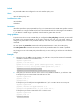
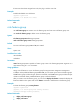
[Sysname-role-role1] rule 5 deny read feature aaa
# Permit role1 to access all read, write, and execute commands of the feature group security-features.
[Sysname-role-role1] rule 6 permit read write execute feature-group security-features
Related commands
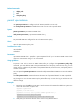
• display role
• display role feature
• display role feature-group
• role
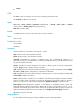
super
Use super to obtain a user role that you are not logged in with.
Syntax
super [ rolename ]
Views
User view
Predefined user roles
network-admin
mdc-admin
Parameters
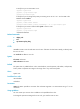
rolename: Specifies a user role, a case-sensitive string of 1 to 63 characters. The user role must exist in
the system. If no user role is specified, you are assigned the following user role:
• You are assigned the user role network-admin if you have logged in to the default MDC.
• You are assigned the user role mdc-admin if you have logged in to the non-default MDCs.
Usage guidelines
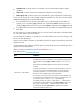
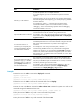
To enable users to obtain the user role that you are not logged in with, you must configure user role
authentication.
• If no local password is configured in the local password authentication (local), an AUX user can
obtain the user role by either entering a string or not entering anything.
• If no local password is configured in the local-then-remote authentication (local scheme):
{ A VTY user performs remote authentication.
{ An AUX user can obtain user role authorization by either entering a string or not entering
anything.
Examples
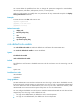
# Obtain the user role network-operator.
<Sysname> super network-operator
Password:
User privilege role is network-operator, and only those commands can be used that authorized
to the role.