
R211x-HP Flexfabric 11900 Fundamentals Configuration Guide

98
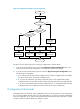
Figure 34 Configuration loading process during startup
The device uses the following process to select the configuration to load at startup:
1. If you access the BootWare menus to select the Skip Current System Configuration option, the
device starts up with empty configuration. All parameters use their initial settings.
2. If you do not access the BootWare menus to select the Skip Current System Configuration option,
the following process applies:
a. If you have specified a main startup configuration file, and this configuration file is available,
the device starts up with this startup configuration file.
b. If you have not specified a main startup configuration file, or the specified main startup
configuration file is not available, the device searches for the backup startup configuration file.
c. If you have not specified a backup startup configuration file, or the specified backup startup
configuration file is not available, the device starts up with empty configuration.
Configuration file formats
Configuration files you specify for saving configuration must use the .cfg extension. A .cfg configuration
file is a human-readable text file. When you save configuration to a .cfg file, the device automatically
saves the configuration to an .mdb user-inaccessible binary file that has the same name as the .cfg file.
The device loads an .mdb file faster than loading a .cfg file.
Start
Enter BootWare
menus?
BootWare runs
Yes
Main
configuration file
available?
No
Yes
Software runs with
settings in main
file
End
Software runs with
initial settings
Load main
configuration file
Load initial
settings
Select "Skip
Current System
Configuration"
No
Yes
Software runs with
settings in backup
file
Load backup
configuration file
Backup
configuration file
available?
No
Software runs with
initial settings
Load initial
settings