
R211x-HP Flexfabric 11900 Fundamentals Configuration Guide

103
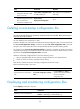
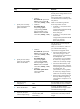
Step Command Remarks
1. Restore the main next-startup
configuration file from a TFTP
server in user view.
restore startup-configuration from
src-addr src-filename
This command is not supported in
FIPS mode.
2. (Optional.) Verify that the
specified configuration file has
been set as the main
next-startup configuration file.
display startup
display saved-configuration
N/A
Deleting a next-startup configuration file
CAUTION:
This task permanently deletes the next-startup configuration file from each MPU. Before performing this
task, back up the file as needed.
You can delete the main, the backup, or both.
To delete a file that is set as both main and backup next-startup configuration files, you must execute both
the reset saved-configuration backup command and the reset saved-configuration main command.
Using only one of the commands removes the specified file attribute instead of deleting the file.
For example, if the reset saved-configuration backup command is executed, the backup next-startup
configuration file setting is set to NULL, but the file is still used as the main file. To delete the file, you must
also execute the reset saved-configuration main command.
Delete the next-startup configuration file if one of the following occurs:
• After you upgrade system software, the file no longer matches the new system software.
• The file is corrupt or not fully compatible with the device.
After the file is deleted, the device uses empty configuration at the next startup.
Perform the following task in user view:
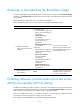
Task Command Remarks
Delete next-startup configuration
files.
reset saved-configuration [ backup |
main ]
If neither backup nor main is
specified, this command deletes
the main next-startup
configuration file.
Displaying and maintaining configuration files
Execute display commands in any view.
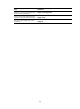
Task Command
Display the running configuration.
display current-configuration [ configuration [ module-name ] |
interface [ interface-type [ interface-number ] ] ]
Display the factory defaults. display default-configuration