
R211x-HP Flexfabric 11900 Fundamentals Configuration Guide


106
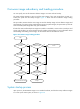
Comware image redundancy and loading procedure
You can specify two sets of Comware software images: one main and one backup.
The system always attempts to start up with the main images. If any main image does not exist or is
invalid, the system tries the backup images. Figure 35 sho
ws the entire Comware image loading
procedure.
This procedure assumes that the main image set and the backup image set have feature images and
patch images. If an image set has neither feature images nor patch images, the system starts up with the
main boot and system images after they pass verification.
If both of the main and backup boot images are invalid or unavailable, connect to the console port and
power cycle the device to access the Boot menu for loading a boot image. For more information about
downloading and loading a boot image, see the release notes for the software version.
Figure 35 Comware image loading procedure
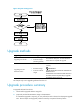
System startup process
Upon power-on, the BootWare image runs to initialize hardware, and then the startup software images
run to start up the entire system, as shown in Figure 36.
Main boot image exists
and valid?
Start
Backup boot image
exists and valid?
No No
Start up from the BootWare
menus
Main system image
exists and valid?
Backup system image
exists and valid?
No No
Yes Yes
All main feature
packages exist and
valid?
All backup feature
packages exist and
valid?
No No
All patch packages exist
and valid?
All backup patch
packages exist and
valid?
No No
Yes Yes
Yes
Yes
Yes Yes
Start up with the main images
Start up with the backup
images