
R211x-HP Flexfabric 11900 Fundamentals Configuration Guide


109
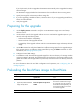
Ste
p
Command
Remarks
4. (Optional.) Back up the
current BootWare image in
the Normal area of
BootWare to the Backup
area.
• In standalone mode:
bootrom backup slot
slot-number-list
• In IRF mode:
bootrom backup chassis
chassis-number slot
slot-number-list
Use one of the commands to back
up the BootWare image for a
future version rollback or image
restoration, depending on the
backup location and device
operating mode.
5. Load the upgrade BootWare
image to the Normal area of
BootWare.
• In standalone mode:
bootrom update file file-url slot
slot-number-list
• In IRF mode:
bootrom update file file-url
chassis chassis-number slot
slot-number-list
Specify the downloaded software
image file for the file-url argument.
The new BootWare image takes
effect at a reboot.
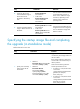
Specifying the startup image file and completing
the upgrade (in standalone mode)
Perform this task in user view.
Ste
p
Command
Remarks
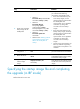
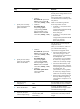
1. Specify main or backup
startup images for the
active MPU.
• Method 1:
boot-loader file ipe-filename slot
slot-number { backup | main }
• Method 2:
boot-loader file boot
boot-package system
system-package [ feature
feature-package&<1-30> ] slot
slot-number { backup | main }
Upgrade files must be saved in the
root directory of a storage medium on
the active MPU.
If the storage medium is partitioned,
save the files to the root directory of
the first partition.
Make sure the following filename
format requirements are met:
• If method 1 is used, the file name
must use the
storage-medium:/base-filename.i
pe format, for example,
flash:/startup.ipe.
• If method 2 is used, all file names
must use the
storage-medium:/base-filename.b
in format, for example,
flash:/startup-boot.bin.