
R211x-HP Flexfabric 11900 Fundamentals Configuration Guide



123
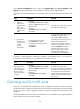
on the Version compatibility list and the value of the Upgrade Way field is Service Upgrade or File
Upgrade, the new and old images are compatible and an incremental upgrade applies.
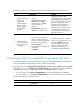
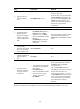
To perform an incremental upgrade to a compatible version, execute the following commands in user
view:
Ste
p
Command Remarks
1. Upgrade the
MPU and
configure the
upgrade images
as the main
startup software
images for the
MPU.
• Method 1:
issu load file { boot filename | system
filename | feature filename&<1-30> } *
slot slot-number
• Method 2:
issu load file ipe ipe-filename slot
slot-number
Specify the slot number of the only MPU
for the slot slot-number option.
2. Complete the
ISSU process or
roll back to the
original
software
configuration.
• To complete the ISSU process:
issu commit slot slot-number
• To roll back to the original software
configuration:
issu rollback
Specify the slot number of the only MPU
for the slot slot-number option.
After the issu commit command is
completed, the ISSU process ends and
the ISSU status changes to Init.
During this ISSU process, automatic
rollback is not supported, but you can
use the issu rollback command to
manually roll back to the original
software configuration. For more
information about rollback, see
Fundamentals Command Reference.
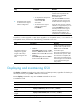
To perform a reboot upgrade or ISSU reboot upgrade to a compatible version, or an ISSU for an
incompatible version, execute one of the following commands in user view:
Task Command Remarks
Upgrade the MPU
and configure the
upgrade images as
the main startup
software images for
the MPU.
• Method 1:
issu load file { boot filename | system
filename | feature filename&<1-30> } *
slot slot-number
• Method 2:
issu load file ipe ipe-filename slot
slot-number
Specify the slot number of the only MPU
for the slot slot-number option.
This single command starts and finishes
the ISSU process. When this command
is completed, the ISSU process ends
and the ISSU status changes to Init. No
rollback can be performed during the
ISSU process.
Performing an ISSU in IRF mode
When you use the issu series commands to install or upgrade the software of MPUs, the device
automatically install or upgrade the software of the service cards and switching fabric cards as needed.
You do not need to install or upgrade the software of the service cards and switching fabric cards
separately.
The ISSU procedure varies by the number of member devices. For an IRF fabric with a single member, the
ISSU procedure varies by the number of MPUs.