
R211x-HP Flexfabric 11900 Fundamentals Configuration Guide



128
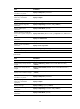
Ste
p
Command
Remarks
2. Complete the ISSU process
or roll back to the original
software configuration.
• To complete the ISSU process:
issu commit chassis
chassis-number slot
slot-number
• To roll back to the original
software configuration:
issu rollback
Specify the member ID and slot
number of the only MPU for the
chassis chassis-number slot
slot-number option.
After the issu commit command is
completed, the ISSU process ends
and the ISSU status changes to Init.
During this ISSU process, automatic
rollback is not supported, but you can
use the issu rollback command to
manually roll back to the original
software configuration. For more
information about rollback, see
Fundamentals Command Reference.
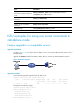
To perform a reboot upgrade or ISSU reboot upgrade to a compatible version, or an ISSU for an
incompatible version, execute one of the following commands in user view:
Task Command
Remarks
Upgrade the MPU and
configure the upgrade
images as the startup
software images for the
MPU.
• Method 1:
issu load file { boot filename | system
filename | feature filename&<1-30> } *
chassis chassis-number slot slot-number
• Method 2:
issu load file ipe ipe-filename chassis
chassis-number slot slot-number
Specify the member ID and slot
number of the only MPU for the
chassis chassis-number slot
slot-number option.
This single command starts and
finishes the ISSU process. When
this command is completed, the
ISSU process ends and the ISSU
status changes to Init. No rollback
can be performed during the
ISSU process.
Displaying and maintaining ISSU
The display and reset commands in this section apply to all ISSU processes, regardless of whether you
start the processes by using install or issu series commands.
Execute display commands in any view and reset commands in user view.
In standalone mode:
Task Command
Display active software images. display install active [ slot slot-number ] [ verbose ]
Display backup startup software
images.
display install backup [ slot slot-number ] [ verbose ]
Display main startup software
images.
display install committed [ slot slot-number ] [ verbose ]
Display inactive software images. display install inactive [ slot slot-number ] [ verbose ]