
R211x-HP Flexfabric 11900 Fundamentals Configuration Guide



130
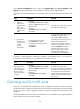
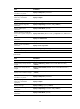
Task Command
Display all software image files
that include a specific component
or file.
display install which [ chassis chassis-number slot slot-number]
{ component name | file filename }
Display automatic-rollback timer
information.
display issu rollback-timer
Display ISSU status information. display issu state
Display version compatibility
information.
display version comp-matrix
Clear ISSU logs. reset install log-history oldest log-number
Clear ISSU rollback points. reset install rollback oldest point-id
ISSU examples for using issu series commands in
standalone mode
Feature upgrade to a compatible version
Upgrade requirement
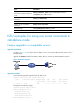
As shown in Figure 39, the device has two MPUs: one in slot 4 (active MPU) and the other in slot 5
(standby MPU).
Upgrade the feature1 feature from R2110 to R2111. The two versions are ISSU-compatible versions.
Figure 39 Network diagram
Upgrade procedure
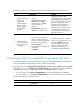
# Download the upgrade image file from the TFTP server.
<Sysname> tftp 2.2.2.2 get feature1-r2111.bin
% Total % Received % Xferd Average Speed Time Time Time Current
Dload Upload Total Spent Left Speed
100 256k 100 256k 0 0 764k 0 --:--:-- --:--:-- --:--:-- 810k
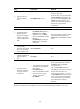
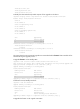
# Display active software images.
<Sysname> display install active
Active packages on slot 4:
flash:/boot-r2110.bin
flash:/system-r2110.bin
flash:/feature1-r2110.bin
Active packages on slot 5: