
R211x-HP Flexfabric 11900 Fundamentals Configuration Guide

141
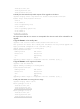
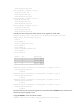
flash:/boot-r2110.bin
flash:/system-r2110.bin
flash:/feature1-r2111.bin
Active packages on chassis 1 slot 5:
flash:/boot-r2110.bin
flash:/system-r2110.bin
flash:/feature1-r2111.bin
Active packages on chassis 2 slot 4:
flash:/boot-r2110.bin
flash:/system-r2110.bin
flash:/feature1-r2111.bin
Active packages on chassis 2 slot 5:
flash:/boot-r2110.bin
flash:/system-r2110.bin
flash:/feature1-r2111.bin
Feature rollback example
Rollback requirement
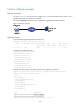
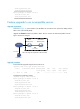
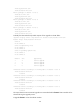
As shown in Figure 44, each member in the IRF fabric has one MPU in slot 4 (the active MPU) and one
MPU in slot 5 (the standby MPU). R2111 and R2110 are compatible.
Roll back the feature1 feature from R2111 to R2110 after upgrading it from R2110 to R2111.
Figure 44 Network diagram
Upgrade procedure
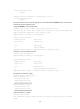
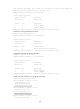
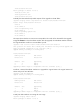
# Download the upgrade image from the TFTP server.
<Sysname> tftp 2.2.2.2 get feature1-r2111.bin
% Total % Received % Xferd Average Speed Time Time Time Current
Dload Upload Total Spent Left Speed
100 256k 100 256k 0 0 764k 0 --:--:-- --:--:-- --:--:-- 810k
# Display active software images.
<Sysname> display install active
Active packages on chassis 1 slot 4:
flash:/boot-r2110.bin
TFTP server
2.2.2.2/24
Internet
IRF
1.1.1.1/24
Master
(Member_ID=1)
Subordinate
(Member_ID=2)
Note: The orange line represents an IRF connection.