
R211x-HP Flexfabric 11900 Fundamentals Configuration Guide

7
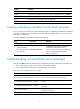
Hotke
y
Function
Esc+F Moves the cursor forward one word.
Esc+N Moves the cursor down one line. This hotkey is available before you press Enter.
Esc+P Moves the cursor up one line. This hotkey is available before you press Enter.
Esc+< Moves the cursor to the beginning of the clipboard.
Esc+> Moves the cursor to the ending of the clipboard.
Enabling redisplaying entered-but-not-submitted commands
Your input might be interrupted by system information output. If redisplaying entered-but-not-submitted
commands is enabled, the system redisplays your input after finishing the output. You can then continue
entering the command line.
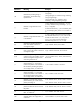
To enable redisplaying entered-but-not-submitted commands:
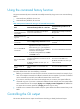
Step Command Remarks
1. Enter system view.
system-view N/A
2. Enable redisplaying
entered-but-not-submit
ted commands.
info-center synchronous
By default, the system does not redisplay
entered-but-not-submitted commands.
For more information about this command, see
Network Management and Monitoring
Command Reference.
Understanding command-line error messages
After you press Enter to submit a command, the command line interpreter examines the command syntax.
• If the command passes syntax check, the CLI executes the command.
• If the command fails syntax check, the CLI displays an error message.
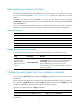
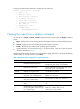
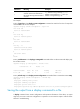
Table 3 Common command-line error messages
Error messa
g
e Cause
% Unrecognized command found at '^' position.
The keyword in the marked position is invalid.
% Incomplete command found at '^' position.
One or more required keywords or arguments are
missing.
% Ambiguous command found at '^' position.
The entered character sequence matches more than one
command.
% Too many parameters.
The entered character sequence contains excessive
keywords or arguments.
% Wrong parameter found at '^' position. The argument in the marked position is invalid.