
R211x-HP Flexfabric 11900 Fundamentals Configuration Guide

151
flash:/system-r2110.bin
flash:/feature1-r2111.bin
Active packages on slot 5:
flash:/boot-r2110.bin
flash:/system-r2110.bin
flash:/feature1-r2111.bin
# Confirm the software change.
<Sysname> install commit
Feature rollback example
Rollback requirement
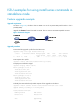
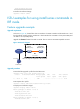
As shown in Figure 45, Device has two MPUs: one in slot 4 (active MPU) and the other in slot 5 (standby
MPU).
Roll back the feature1 feature from R2111 to R2110.
Rollback procedure
# Display active software images.
<Sysname> display install active
Active packages on slot 4:
flash:/boot-r2110.bin
flash:/system-r2110.bin
flash:/feature1-r2111.bin
Active packages on slot 5:
flash:/boot-r2110.bin
flash:/system-r2110.bin
flash:/feature1-r2111.bin
# Display available rollback points.
<Sysname> display install rollback
Install rollback information 1 on slot 4:
Updating from flash:/feature1-r2110.bin
to flash:/feature1-r2111.bin.
Install rollback information 2 on slot 5:
Updating from flash:/feature1-r2110.bin
to flash:/feature1-r2111.bin.
# Roll back the feature to R2110.
<Sysname> install rollback to original
# Display active software images.
<Sysname> display install active
Active packages on slot 4:
flash:/boot-r2110.bin
flash:/system-r2110.bin
flash:/feature1-r2110.bin
Active packages on slot 5:
flash:/boot-r2110.bin
flash:/system-r2110.bin