
R211x-HP Flexfabric 11900 Fundamentals Configuration Guide




162
Ste
p
Command
Remarks
2. Set the operating mode.
system-working-mode { advance |
standard }
By default, the device operates in
standard mode.
Rebooting the device
CAUTION:
• A reboot can interrupt network services.
• To avoid configuration loss, use the save command to save the running configuration before a reboot.
For more information about the save command, see
Fundamentals Command Reference
.
• Before a reboot, use the display startup and display boot-loader commands to verify that you have
correctly specified the startup configuration file and startup software images. If the main startup
software images are corrupted or missing, you must re-specify a set of main startup software images
before using the reboot command to reboot the device. Otherwise, the device cannot start up. For more
information about the two display commands, see
Fundamentals Command Reference
.
The following device reboot methods are available:
• Immediately reboot the device at the CLI.
• Schedule a reboot at the CLI, so the device automatically reboots at the specified time or after the
specified period of time.
• Power off and then power on the device. This method might cause data loss, and is the
least-preferred method.
Using the CLI, you can reboot the device from a remote host.
Configuration guidelines
• In standalone mode, the automatic reboot configuration is canceled if an active/standby
switchover occurs.
• In IRF mode, the automatic reboot configuration is effective on all member devices, and will be
canceled if a switchover between the global active MPU and a global standby MPU occurs.
• For data security, the device does not reboot while it is performing file operations.
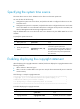
Rebooting devices immediately at the CLI
Execute one of the following commands as appropriate in user view:
Task Command Remarks
Reboot a card, a subcard, or the entire
device. (In standalone mode.)
reboot [ slot slot-number ] [ force ] Available in user view.
Reboot an IRF member device, a subcard,
or all IRF member devices. (In IRF mode.)
reboot [ chassis chassis-number
[ slot slot-number ] ] [ force ]
Available in user view.