
R211x-HP Flexfabric 11900 Fundamentals Configuration Guide

163
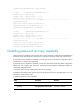
Scheduling a device reboot
The device supports only one device reboot schedule. If you configure the scheduler reboot at or
scheduler reboot delay command multiple times or configure both commands, the most recent
configuration takes effect.
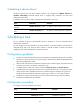
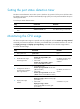
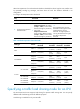
To schedule a reboot, execute either of the following commands in user view:
Task Command
Remarks
Specify the reboot date
and time.
scheduler reboot at time [ date ]
By default, no reboot date or time is specified.
Specify the reboot delay
time.
scheduler reboot delay time By default, no reboot delay time is specified.
Scheduling a task
You can schedule the device to automatically execute a command or a set of commands without
administrative interference.
You can configure a one-time schedule or a periodic schedule. A one-time schedule is not saved to the
configuration file and is lost when the device reboots. A periodic schedule is saved to the startup
configuration file and is automatically executed periodically.
Configuration guidelines
• To make sure a task schedule can be executed as expected, reconfigure the system time or configure
NTP after you reboot the device. For more information about NTP, see Network Management and
Monitoring Configuration Guide.
• Make sure all commands in a schedule are compliant to the command syntax. The system does not
check the syntax when you assign a command to a job.
• A schedule cannot contain any of these commands: telnet, ftp, ssh2, and monitor process.
• A schedule does not support user interaction. If a command requires a yes or no answer, the system
always assumes that a Y or Yes is entered. If a command requires a character string input, the
system assumes that the default character string (if any) is entered, or a null string is entered.
• A schedule is executed in the background, and no output (except for logs, traps, and debug
information) is displayed for the schedule.
Configuration procedure
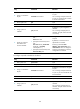
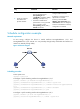
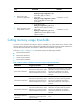
To configure a one-time schedule for the device:
Step Command Remarks
1. Enter system view.
system-view N/A
2. Create a job.
scheduler job job-name By default, no job exists.