
R211x-HP Flexfabric 11900 Fundamentals Configuration Guide



173
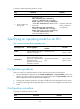
To specify a traffic load sharing mode for an LPU:
Ste
p
Command
Remarks
1. Enter system view.
system-view N/A
2. Specify a traffic load
sharing mode.
• In standalone mode:
fabric load-sharing mode { destination-ip
{ source-ip } | destination-mac { source-mac } |
flexible | ingress-port | source-ip { destination-ip }
| source-mac { destination-mac } slot slot-number }
• In IRF mode:
fabric load-sharing mode { destination-ip
{ source-ip } | destination-mac { source-mac } |
flexible | ingress-port | source-ip { destination-ip }
| source-mac { destination-mac } chassis
chassis-number slot slot-number }
By default, traffic load
sharing is performed
per ingress port.
Specifying an operating mode for an LPU
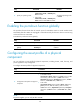
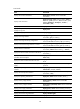
Table 17 LPU and operating mode compatibility matrix
Operating mode Feature highlights
Recommended application
scenario
SF cards
normal
Uses the default MAC address
table and routing table.
Common networks.
MAC: 128 KB
Routing: 16 KB
standard-ipv6
Automatically optimizes
resource sharing for ND and
ARP entries, so the LPU has the
optimal forwarding
performance in an IPv4/IPv6
dual-stack environment.
The IPv4/IPv6 dual-stack is
used.
MAC: 128 KB
Routing: 16 KB
Configuration guidelines
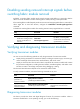
When you specify an operating mode for an LPU, follow these restrictions and guidelines:
• The LSU1TGS48SF LPU supports only the normal, standard-ipv6, and port-extender modes. It can
operate in one of the modes at a moment. For more information about the port-extender mode, see
TRILL Configuration Guide and TRILL Command Reference.
• Changing the operating mode for an LPU does not affect the overall specifications of the switch.
• To make an operating mode change take effect, you must save the configuration and reboot the
switch.
Configuration procedure
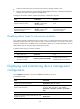
To specify an operating mode for a card:
Ste
p
Command
Remarks
1. Enter system view.
system-view N/A