
R211x-HP Flexfabric 11900 Fundamentals Configuration Guide

174
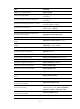
Ste
p
Command
Remarks
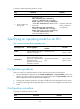
2. Specify an operating mode.
• In standalone mode:
switch-mode { normal | standard-ipv6 }
slot slot-number
• In IRF mode:
switch-mode { normal | standard-ipv6 }
chassis chassis-number slot slot-number
The default operating mode
is normal.
Enabling the port-down function globally
The port-down function shuts down all network ports of a standalone switch or an IRF member switch
immediately after all its MPUs are unplugged or reboot abnormally. This function does not work as long
as the switch has an active MPU.
To enable the port-down function globally:
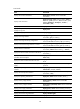
Ste
p
Command
Remarks
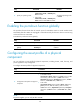
1. Enter system view. system-view N/A
2. Enable the port-down function
globally.
monitor handshake-timeout
disable-port
By default, this function is
enabled.
Configuring the asset profile of a physical
component
You can configure an asset profile for physical components, including chassis, cards, fan trays, and
power supplies for easy management.
To configure the asset profile of a physical component:
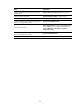
Ste
p
Command
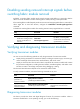
1. Enter system view. system-view
2. Configure the asset profile of a physical
component.
• In standalone mode:
set asset-info { chassis | fan fan-id | power power-id | slot
slot-number } { csn csn-number | custom name value |
department department | description description | location
location | service-date date | state state }
• In IRF mode:
set asset-info chassis chassis-number { chassis | fan fan-id |
power power-id | slot slot-number } { csn csn-number |
custom name value | department department | description
description | location location | service-date date | state
state }
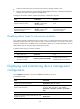
NOTE:
For power supplies, you can only set their asset IDs.