
R211x-HP Flexfabric 11900 Fundamentals Configuration Guide

176
• Check the alarms that exist on the transceiver module to identify the fault source.
• Examine the key parameters monitored by the digital diagnosis function, including the temperature,
voltage, laser bias current, TX power, and RX power.
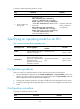
To diagnose transceiver modules, execute the following commands in any view:
Task Command Remarks
Display transceiver alarms.
display transceiver alarm
interface [ interface-type
interface-number ]
N/A
Display the current values of the
digital diagnosis parameters on
transceiver modules.
display transceiver diagnosis
interface [ interface-type
interface-number ]
This command cannot display
information about some
transceiver modules.
Disabling alarm traps for transceiver modules
If you install a transceiver module that has no vendor name or a vendor name other than HP, the system
repeatedly outputs traps and logs to notify the user to replace the module. To continue to use such a
transceiver module that is manufactured or customized by HP but has no vendor information, you can
disable alarm traps so the system stops outputting alarm traps.
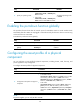
To disable alarm traps for transceiver modules:
Step Command Remarks
1. Enter system view.
system-view N/A
2. Disable alarm traps for
transceiver modules.
transceiver phony-alarm-disable
By default, alarm traps are
enabled for transceiver modules.
Displaying and maintaining device management
configuration
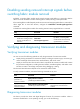
Execute display commands in any view and reset commands in user view.
In standalone mode:
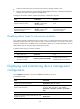
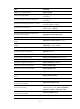
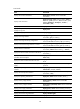
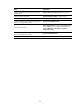
Task Command
Display device alarm information. display alarm [ slot slot-number ]
Display asset information.
display asset-info { chassis | fan fan-id | power
power-id | slot slot-number } [ csn | custom|
department | description | location | service-date |
state ]
Display system version information. display version
Display the system time, date, local time zone, and
daylight saving time.
display clock