
R211x-HP Flexfabric 11900 Fundamentals Configuration Guide

182
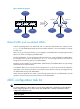
Figure 49 Network diagram
Default MDC and non-default MDCs
A device supporting MDCs is an MDC itself, and it is called the "default MDC" (for example, Device
in Figure 49)
. The default MDC always uses the name Admin and the ID 1. You cannot delete it or change
its name or ID.
When you log in to the physical device, you are logged in to the default MDC. Configuring the physical
device is the same as configuring the default MDC.
From the default MDC, you can manage the entire physical device, create and delete non-default MDCs
(for example, Device A, Device B, and Device C in Figure 49)
, and assign interfaces, CPU resources,
storage space, and memory space to non-default MDCs.
No MDCs can be created on a non-default MDC. Administrators of non-default MDCs can only manage
and maintain their respective MDCs.
A non-default MDC can use only the resources assigned to it. It cannot use the resources assigned to
other MDCs or the remaining resources on the physical device. Resources that are not assigned to any
non-default MDC belong to the default MDC.
Unless otherwise stated, the term "MDC" in the following sections refers to a non-default MDC, and all
operations in the following sections are performed on the default MDC.
MDC configuration task list
IMPORTANT:
To configure MDCs for a device that you want to add to an IRF fabric, add the device to the IRF fabric
before configuring MDCs for it. After a device joins an IRF fabric, it reboots and loads the master's
configuration instead of its own.
Tasks at a
g
lance
(Required.) Creating an MDC
Device
Device A Device B Device C
Gateway 1
Gateway 2
Gateway 3
LAN 1 LAN 3
LAN 1
LAN 2
LAN 3
InternetInternet
LAN 2
Equals