
R211x-HP Flexfabric 11900 Fundamentals Configuration Guide

186
Ste
p
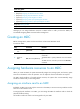
Command
Remarks
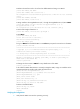
1. Enter system view.
system-view N/A
2. Enter MDC view.
mdc mdc-name [ id mdc-id ] N/A
3. Specify a disk
space percentage
for the MDC.
• In standalone mode:
limit-resource disk slot slot-number ratio
limit-ratio
• In IRF mode:
limit-resource disk chassis chassis-number slot
slot-number ratio limit-ratio
By default, all MDCs share
the disk space on the MPUs
in the system, and an MDC
can use all the free disk
space.
Specifying a memory space percentage for an MDC
All MDCs share and compete for the memory space of the MPUs in the system. If an MDC occupies too
much memory space, the other MDCs might not be able to operate correctly. To avoid this problem,
specify a memory space percentage for each MDC.
Before you specify a memory space percentage for an MDC, use the display mdc resource command to
view how much memory space the MDC is using. Make sure the memory space you assign to an MDC
is sufficient for the MDC to operate correctly.
To specify a memory space percentage for an MDC:
Ste
p
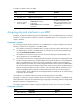
Command
Remarks
1. Enter system view.
system-view N/A
2. Enter MDC view.
mdc mdc-name [ id mdc-id ] N/A
3. Specify a memory space
percentage for the MDC.
• In standalone mode:
limit-resource memory slot
slot-number ratio limit-ratio
• In IRF mode:
limit-resource memory chassis
chassis-number slot slot-number
ratio limit-ratio
By default, all MDCs share the
memory space on the MPUs in the
system, and an MDC can use all
the free memory space.
Starting an MDC
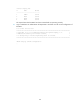
Ste
p
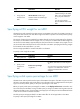
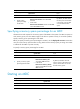
Command
1. Enter system view.
system-view
2. Enter MDC view.
mdc mdc-name [ id mdc-id ]
3. Start the MDC.
mdc start