
R211x-HP Flexfabric 11900 Fundamentals Configuration Guide

187
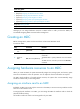
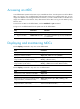
Accessing an MDC
A non-default MDC operates in the same way as a standalone device. From the system view of the default
MDC, you can log in to a non-default MDC and enter MDC system view. In MDC system view, you can
assign an IP address to the management Ethernet interface, or create a VLAN interface on the MDC and
assign an IP address to the interface. Then, administrators of the MDC can log in to the MDC by using
Telnet or SSH.
To return from an MDC to the default MDC, use the switchback or quit command.
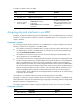
To log in to a non-default MDC from the system view of the default MDC:
Ste
p
Command
Remarks
1. Enter system view.
system-view N/A
2. Log in to an MDC.
switchto mdc mdc-name
You use this command to log in to only an MDC that
is in active state.
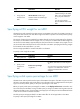
Displaying and maintaining MDCs
Execute display commands in any view on the default MDC:
Task Command
Display MDCs and their status. display mdc [ name mdc-name ]
Display the interfaces of MDCs. display mdc [ name mdc-name ] interface
Display the CPU, disk space, and memory space
usage of MDCs. (In standalone mode.)
display mdc [ name mdc-name ] resource [ cpu | disk |
memory ] [ slot slot-number ]
Display the CPU, disk space, and memory space
usage of MDCs. (In IRF mode.)
display mdc [ name mdc-name ] resource [ cpu | disk |
memory ] [ chassis chassis-number slot slot-number ]
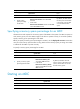
Execute display commands in any view on a non-default MDC:
Task Command
Display the ID, name, and status of the MDC. display mdc
Display the interfaces of the MDC. display mdc interface
Display the CPU, disk space, and memory space
usage of the MDC. (In standalone mode.)
display mdc resource [ cpu | disk | memory ] [ slot
slot-number ]
Display the CPU, disk space, and memory space
usage of the MDC. (In IRF mode.)
display mdc resource [ cpu | disk | memory ] [ chassis
chassis-number slot slot-number ]