19
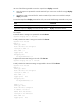
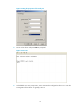
Figure 6 Setting the properties of the serial port
5. Power on the device and press Enter as prompted.
Figure 7 Device CLI
6. At the default user view prompt <HP>, enter commands to configure the device or to view the
running status of the device. To get help, enter ?.