
R211x-HP Flexfabric 11900 Fundamentals Configuration Guide

28
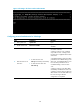
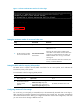
Figure 9 Telnetting to the device without authentication
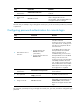
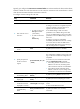
Configuring password authentication for Telnet login
Ste
p
Command
Remarks
1. Enter system view.
system-view N/A
2. Enable Telnet server.
telnet server enable
By default, the Telnet server function is
disabled.
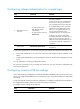
3. Enter VTY line view or
class view.
• To enter VTY line view:
line vty first-number [ last-number ]
• To enter VTY line class view:
line class vty
Use either command.
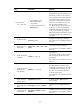
A setting in user line view is applied
only to the user line. A setting in user
line class view is applied to all user lines
of the class.
A non-default setting in either view takes
precedence over a default setting in the
other view. A non-default setting in user
line view takes precedence over a
non-default setting in user line class
view.
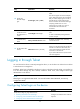
A setting in user line view takes effect
immediately and affects the online user.
A setting in user line class view does not
affect online users and takes effect only
for users who log in after the
configuration is completed.