
R211x-HP Flexfabric 11900 Fundamentals Configuration Guide

39
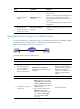
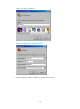
Figure 17 Dialing the number
8. After you hear the dial tone, press Enter as prompted:
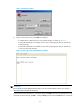
{ If authentication is disabled, the user view prompt appears, as shown in Figure 18.
{ If password authentication is enabled, the user view prompt appears after you provide the
correct password.
{ If password authentication is enabled, the user view prompt appears after you provide the
correct username and password.
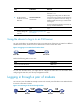
Figure 18 Login page when authentication is disabled
IMPORTANT:
Do not directly close the HyperTerminal. Doing so can cause some modems to stay in use, and your
subsequent dial-in attempts will always fail.
To disconnect the PC from the device, execute the appropriate ATH command in the HyperTerminal. If the
command cannot be entered, type AT+ + + and press Enter, and when the word OK appears, execute the