
R211x-HP Flexfabric 11900 Fundamentals Configuration Guide


49
This section provides only the procedure for configuring command accounting. To make the command
accounting function take effect, you must configure a command accounting method in ISP domain view.
For more information, see Security Configuration Guide.
Configuration procedure
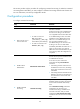
To configure command accounting:
Ste
p
Command
Remarks
1. Enter system view.
system-view N/A
2. Enter user line view or
user line class view.
• To enter user line view:
line { first-number1
[ last-number1 ] | { aux | vty }
first-number2 [ last-number2 ] }
• To enter user line class view:
line class { aux | vty }
Use either command.
A setting in user line view is applied only to
the user line. A setting in user line class
view is applied to all user lines of the class.
A non-default setting in either view takes
precedence over a default setting in the
other view. A non-default setting in user
line view takes precedence over a
non-default setting in user line class view.
A setting in user line view takes effect
immediately and affects the online user. A
setting in user line class view does not
affect online users and takes effect only for
users who log in after the configuration is
completed.
3. Enable scheme
authentication.
authentication-mode scheme
By default, authentication is disabled for
the AUX line and password authentication
is enabled for the VTY line.
In VTY line view, this command is
associated with the protocol inbound
command:
• If the setting of either command is not
the default in VTY line view, the setting
of the other command in VTY line view
takes effect.
• If the settings of both commands are the
defaults in VTY line view, the settings of
the commands in VTY line class view
take effect.
4. Enable command
accounting.
command accounting
By default, command accounting is
disabled, and the accounting server does
not record the commands executed by
users.
If the command accounting command is
configured in user line class view,
command accounting is enabled on all
user lines in the class, and you cannot
configure the undo command accounting
command in the view of a user line in the
class.