
R211x-HP Flexfabric 11900 Fundamentals Configuration Guide

61
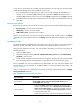
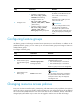
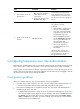
Ste
p
Command
Remarks
2. Enter user line view or user
line class view.
• To enter user line view:
line { first-num1 [ last-num1 ] |
{ aux | vty } first-num2
[ last-num2 ] }
• To enter user line class view:
line class { aux | vty }
For information about the priority
order and application scope of the
configurations in user line view and
user line class view, see "Logging into
the CLI."
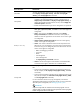
3. Specify a user role on the
user line.
user-role role-name
Repeat this step to specify up to 64
user roles on a user line.
By default:
• Network-admin is specified on the
AUX user line for default-MDC
login users, and network-operator
is specified on any other user line
for default-MDC login users.
• After a default-MDC login user
uses the switchto mdc command to
log in to a non-default MDC, its
user role changes from
network-admin to mdc-admin.
• The user role assigned to a
non-default MDC login user is
mdc-operator.
The device does not assign the
security-audit user role to the users
who are logged in to the device
through the current user line.
Configuring temporary user role authorization
Temporary user role authorization allows you to obtain a temporary user role without reconnecting to the
device. This function is useful when you want to use a user role temporarily to configure a feature.
Temporary user role authorization is effective only on the current login. It does not change the user role
settings in the user account that you have been logged in with. The next time you are logged in with the
user account, the original user role settings take effect.
Configuration guidelines
When you configure temporary user role authorization, follow these guidelines:
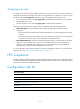
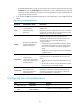
• To enable users to obtain temporary user roles, you must configure user role authentication. Table
10 de
scribes the available authentication modes and configuration requirements.
• Local password authentication is available for all user roles, but remote AAA authentication is
available only for level-n user roles.
{ If HWTACACS authentication is used, use a user account that has the target user role level or a
user role level higher than the target user role. For example, if the user account test has the user
role level-3, you can use this user account to obtain the authorization of the level-0, level-1,
level-2, or level-3 user role. When you use this method, you must enter the correct username
and password to pass authentication.