
R211x-HP Flexfabric 11900 Fundamentals Configuration Guide

62
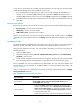
{ If RADIUS authentication is used, you must create a user account for each level-n user role in the
$enabn$ format or the $enabn$@domain-name format, where n represents the user role level.
When you use this method, the username you enter is ignored. You can pass authentication as
long as the password is correct.
• If you execute the quit command after obtaining user role authorization, you are logged out of the
device.
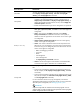
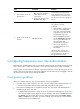
Table 10 User role authentication modes
Keywords Authentication mode Description
local
Local password
authentication only
(local-only)
The device uses the locally configured password for
authentication.
If no local password is configured for a user role in this mode,
an AUX user can obtain the user role authorization by either
entering a string or not entering anything.
scheme
Remote AAA authentication
through HWTACACS or
RADIUS (remote-only)
The device sends the username and password to the
HWTACACS or RADIUS server for remote authentication.
To use this mode, you must perform the following
configuration tasks:
• Configure the required HWTACACS or RADIUS scheme,
and configure the ISP domain to use the scheme for the
user. For more information, see Security Configuration
Guide.
• Add the user account and password on the HWTACACS
or RADIUS server.
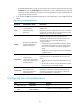
local scheme
Local password
authentication first, and then
remote AAA authentication
(local-then-remote)
Local password authentication is performed first.
If no local password is configured for the user role in this
mode:
• The device performs remote AAA authentication for VTY
users.
• An AUX user can obtain user role authorization by either
entering a string or not entering anything.
scheme local
Remote AAA authentication
first, and then local
password authentication
(remote-then-local)
Remote AAA authentication is performed first. If the
HWTACACS or RADIUS server does not respond, or the
remote AAA configuration on the device is invalid, local
password authentication is performed.
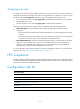
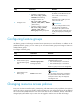
Configuring user role authentication
Ste
p
Command
Remarks
1. Enter system view.
system-view N/A
2. Set an authentication
mode.
super authentication-mode
{ local | scheme } *
By default, local-only authentication applies.