
R211x-HP Flexfabric 11900 Fundamentals Configuration Guide

76
• Remote authorization—A remote authorization server assigns authorized directories on the device
to FTP clients.
For information about configuring authentication and authorization, see Security Configuration Guide.
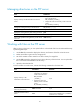
Manually releasing FTP connections
Task Command
Manually release FTP connections.
• Release the FTP connection established using a specific user
account:
free ftp user username
• Release the FTP connection to a specific IP address:
free ftp user-ip [ ipv6 ] client-address [ port port-num ]
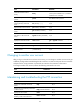
Displaying and maintaining the FTP server
Execute display commands in any view.
Task Command
Display FTP server configuration and status information.
display ftp-server
Display detailed information about online FTP users. display ftp-user
FTP server configuration example in standalone mode
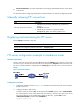
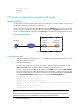
Network requirements
Create a local user account with username abc and password 123456 on the FTP server. Use the user
account to log in to the FTP server from the FTP client, upload the file temp.bin from the FTP client to the
FTP server, and download the configuration file startup.cfg from the FTP server to the FTP client for
backup.
Figure 29 Network diagram
Configuration procedure
1. Configure IP addresses as shown in Figure 29, and make sure the device and PC can reach other.
(Details not shown.)
2. Configure the device (FTP server):
# Create a local user account abc. Set the password to 123456, the user role to network-admin,
the working directory to the active MPU's Flash root directory, and the service type to FTP. (To set
the working directory to the standby MPU's Flash root directory, replace flash:/ in the
authorization-attribute command with slot1#flash:/.)
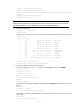
<Sysname> system-view