
R211x-HP Flexfabric 11900 Fundamentals Configuration Guide

77
[Sysname] local-user abc class manage
[Sysname-luser-abc] password simple 123456
[Sysname-luser-abc] authorization-attribute user-role network-admin work-directory
flash:/
[Sysname-luser-abc] service-type ftp
[Sysname-luser-abc] quit
NOTE:
If the password control feature is configured, the password must meet the password requirements
defined by the feature. For more information, see
Security Configuration Guide
.
# Enable the FTP server.
[Sysname] ftp server enable
[Sysname] quit
# Examine the storage space for space insufficiency and delete unused files for more free space.
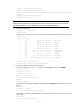
<Sysname> dir
Directory of flash:
0 -rw- 0 Sep 27 2010 14:43:34 kernel.bin
1 -rw- 0 Sep 27 2010 14:43:34 base.bin
2 drw- - Jun 29 2011 18:30:38 logfile
3 drw- - Jun 21 2011 14:51:38 diagfile
4 drw- - Jun 21 2011 14:51:38 seclog
5 -rw- 2943 Jul 02 2011 08:03:08 startup.cfg
6 -rw- 63901 Jul 02 2011 08:03:08 startup.mdb
7 -rw- 716 Jun 21 2011 14:58:02 hostkey
8 -rw- 572 Jun 21 2011 14:58:02 serverkey
9 -rw- 6541264 Aug 04 2011 20:40:49 backup.bin
473664 KB total (467080 KB free)
<Sysname> delete /unreserved flash:/backup.bin
3. Perform FTP operations from the PC (FTP client):
# Log in to the FTP server at 1.1.1.1 using the username abc and password 123456.
c:\> ftp 1.1.1.1
Connected to 1.1.1.1.
220 FTP service ready.
User(1.1.1.1:(none)):abc
331 Password required for abc.
Password:
230 User logged in.
# Use the ASCII mode to download the configuration file startup.cfg from the device to the PC for
backup.
ftp> ascii
200 TYPE is now ASCII
ftp> get startup.cfg back-startup.cfg
# Use the binary mode to upload the file temp.bin from the PC to the Flash root directory of the
active MPU.
ftp> binary
200 TYPE is now 8-bit binary