
R211x-HP Flexfabric 11900 Fundamentals Configuration Guide

78
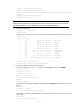
ftp> put temp.bin
# Exit FTP.
ftp> bye
FTP server configuration example in IRF mode
Network requirements
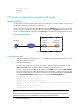
An IRF fabric that has two member devices acts as the FTP server. On each member, the active and
standby MPUs reside in slot 4 and slot 5, respectively.
Create a local user account with username abc and password 123456 on the FTP server. Use the user
account to log in to the FTP server from the FTP client, upload the file temp.bin from the FTP client to the
FTP server, and download the configuration file config.cfg from the FTP server to the FTP client for backup.
Figure 30 Network diagram
Configuration procedure
1. Configure IP addresses as shown in Figure 30, and make sure the IRF fabric and the PC can reach
each other. (Details not shown.)
2. Configure the FTP server:
# Examine the storage space on the member devices. If the free space is insufficient, use the
delete/unreserved file-url command to delete unused files. (Details not shown.)
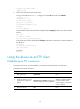
# Create a local user account abc. Set the password to 123456, the user role to network-admin,
the working directory to the global active MPU's Flash root directory, and the service type to FTP.
(To set the working directory to the Flash root directory of a global standby MPU, replace flash:/
in the authorization-attribute command with, for example, chassis2#slot1#flash:/.)
<Sysname> system-view
[Sysname] local-user abc class manage
[Sysname-luser-abc] password simple 123456
[Sysname-luser-abc] authorization-attribute user-role network-admin work-directory
flash:/
[Sysname-luser-abc] service-type ftp
[Sysname-luser-abc] quit
NOTE:
If the password control feature is configured, the password must meet the password requirements
defined by the feature. For more information, see
Security Configuration Guide
.
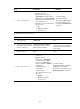
# Enable the FTP server.
Internet
PC
FTP client
1.2.1.1/16
Note: The orange line represents an IRF connection.
IRF (FTP server)
IP: 1.1.1.1/16
Master
(Member_ID=1)
Subordinate
(Member_ID=2)