
R211x-HP Flexfabric 11900 Fundamentals Configuration Guide

79
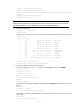
[Sysname] ftp server enable
[Sysname] quit
3. Perform FTP operations from the FTP client:
# Log in to the FTP server at 1.1.1.1 using the username abc and password 123456.
c:\> ftp 1.1.1.1
Connected to 1.1.1.1.
220 FTP service ready.
User(1.1.1.1:(none)):abc
331 Password required for abc.
Password:
230 User logged in.
# Use the ASCII mode to download the configuration file config.cfg from the server to the client for
backup.
ftp> ascii
200 TYPE is now ASCII
ftp> get config.cfg back-config.cfg
# Use the binary mode to upload the file temp.bin to the Flash root directory of the active MPU of
the IRF fabric.
ftp> binary
200 TYPE is now 8-bit binary
ftp> put temp.bin
# Exit FTP.
ftp> bye
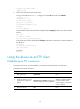
Using the device as an FTP client
Establishing an FTP connection
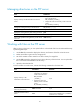
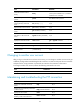
To access the FTP server, you must establish a connection from the FTP client to the FTP server.
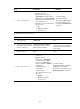
To establish an IPv4 FTP connection:
Ste
p
Command
Remarks
1. Enter system view.
system-view N/A
2. (Optional.) Specify a source
IP address for outgoing FTP
packets.
ftp client source { interface interface-type
interface-number | ip source-ip-address }
By default, no source IP
address is specified, and the
primary IP address of the
output interface is used as the
source IP address.
3. Return to user view.
quit N/A