
R211x-HP Flexfabric 11900 Fundamentals Configuration Guide

82
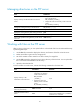
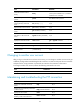
Task Command
Remarks
Set the file transfer mode to
binary.
binary
The default transfer mode is ASCII in
versions prior to Release 2111, and binary
in Release 2111 and later.
Set the FTP operation mode to
passive.
passive The default mode is passive.
Display or change the local
working directory of the FTP
client.
lcd [ directory | / ] N/A
Upload a file to the FTP server. put localfile [ remotefile ] N/A
Download a file from the FTP
server.
get remotefile [ localfile ] N/A
Add the content of a file on the
FTP client to a file on the FTP
server.
append localfile [ remotefile ]
N/A
Specify the retransmit marker. restart marker
Use this command together with the put,
get, or append command.
Update the local file. newer remotefile N/A
Get the missing part of a file. reget remotefile [ localfile ] N/A
Rename the file.
rename [ oldfilename
[ newfilename ] ]
N/A
Changing to another user account
After you log in to the FTP server with one user account, you can change to another user account to get
a different privilege without reestablishing the FTP connection. You must correctly enter the new username
and password. A wrong username or password can cause the FTP connection to disconnect.
To change to another user account, execute the following command in user view:
Task Command
Change to another user account. user username [ password ]
Maintaining and troubleshooting the FTP connection
Task Command
Remarks
Display FTP commands on the FTP
server.
rhelp N/A
Display FTP commands help information
on the FTP server.
rhelp protocol-command N/A
Display FTP server status. rstatus N/A
Display detailed information about a
directory or file on the FTP server.
rstatus remotefile N/A