
R211x-HP Flexfabric 11900 Fundamentals Configuration Guide

85
ftp> put startup.cfg back-startup.cfg
local: startup.cfg remote: back-startup.cfg
150 Connecting to port 47461
226 File successfully transferred
3494 bytes sent in 5.646 seconds (618.00 kbyte/s)
ftp> bye
221-Goodbye. You uploaded 2 and downloaded 2 kbytes.
221 Logout.
<Sysname>
FTP client configuration example in IRF mode
Network requirements
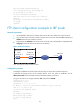
• Use the IRF fabric that has two member devices as the FTP client and the PC as the FTP server.
• Log in to the FTP server from the FTP client using the user account with username abc and password
123 456 (which has been created on the PC).
• Download the file temp.bin from the FTP server to the FTP client, and upload the configuration file
config.cfg from the FTP client to the FTP server for backup.
Figure 32 Network diagram
Configuration procedure
# Configure IP addresses for devices and make sure they can reach other. (Details not shown.)
# Examine the storage space on the member devices. If the free space is insufficient, use the
delete/unreserved file-url command to delete unused files. (Details not shown.)
# Log in to the FTP server using the username abc and password 123 456 .
<Sysname> ftp 10.1.1.1
Press CTRL+C to abort.
Connected to 10.1.1.1 (10.1.1.1).
220 WFTPD 2.0 service (by Texas Imperial Software) ready for new user
User (10.1.1.1:(none)): abc
331 Give me your password, please
Password:
230 Logged in successfully
Remote system type is MSDOS.
200 Type is Image (Binary)
ftp>
Internet
IRF (FTP client)
IP:
10.2.1.1/16
Master
(Member_ID=1)
Subordinate
(Member_ID=2)
10.1.1.1/16
FTP server
PC
Note: The orange line represents an IRF connection.