
R211x-HP Flexfabric 11900 Fundamentals Configuration Guide

89
Managing the file system
This chapter describes how to manage the device's file system, including the storage media, directories,
and files.
IMPORTANT:
• Before managing storage media, files, and directories, make sure you know the possible impacts.
• A file or directory whose name starts with a period (.) is considered a hidden file or directory. Do not
give a common file or directory a name that starts with a period.
• Some system files and directories are hidden.
File name formats
IMPORTANT:
Enter a storage medium name in lower case, including the chassis and slot strin
g
s (if any). Otherwise, the
following error message is displayed: "The file or directory doesn't exist." Folder names and file names
are case insensitive.
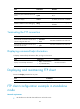
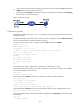
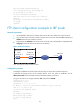
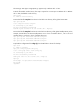
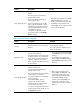
When you specify a file, enter the file name in one of the formats shown in Table 11 and Table 12. When
you specify a directory, follow the rules for the drive and path arguments.
Table 11 File name formats in standalone mode
Format Descri
p
tion
Exam
p
le
file-name
Specifies a file in the current working
directory.
a.cfg indicates a file named a.cfg in the
current working directory.
This working directory might be on the
active MPU or standby MPU.
[path/]file-name
Specifies a file in a specific folder in
the current working directory.
The path argument represents the
path to the file. If the file is in a
single-level folder, specify the folder
name for the argument. If the file is in
a nested folder, separate each folder
name by a forward slash (/).
• test/a.cfg indicates a file named a.cfg
in the test folder in the current working
directory.
• test/subtest/a.cfg indicates a file
named a.cfg in the subtest subfolder of
the test folder in the current working
directory.