
R211x-HP Flexfabric 11900 High Availability Command Reference
14
• display oam link-event
• oam global errored-frame-period window
oam errored-frame-seconds threshold
Use oam errored-frame-seconds threshold to set the errored frame seconds event triggering threshold on
a port.
Use undo oam errored-frame-seconds threshold to restore the default.
Syntax
oam errored-frame-seconds threshold threshold-value
undo oam errored-frame-seconds threshold
Default
The port uses the global setting.
Views
Layer 2 Ethernet port view, Layer 3 Ethernet port view
Predefined user roles
network-admin
mdc-admin
Parameters
threshold-value: Specifies the errored frame seconds event triggering threshold in the range of 0 to 900.
Usage guidelines
The value of the errored frame seconds event triggering threshold cannot be greater than the value of the
errored frame seconds event detection window (in seconds). Otherwise, errored frame seconds events
cannot be generated.
The configuration in port view takes effect on the specified port. For a port, the configuration in port view
takes precedence.
Examples
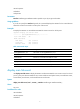
# Set the errored frame seconds event triggering threshold on Ten-GigabitEthernet 1/0/1 to 100.
<Sysname> system-view
[Sysname] interface ten-gigabitethernet 1/0/1
[Sysname-Ten-GigabitEthernet1/0/1] oam errored-frame-seconds threshold 100
Related commands
• display oam configuration
• display oam link-event
• oam errored-frame-seconds window
• oam global errored-frame-seconds threshold
oam errored-frame-seconds window
Use oam errored-frame-seconds window to set the errored frame seconds event detection window.